
Online shopping feels simple because every order looks small on its own. But over weeks and months, those separate purchases on Amazon and Flipkart can turn into a much bigger number than most people expect. That is exactly why the Ecom Spending Calculator on Spending Calculator for Amazon and Flipkart is useful.
It helps users review order history in a clearer way and understand how much they have really spent. Instead of manually opening old orders one by one, users get a faster and more practical way to track spending, review shopping patterns, and stay more aware of their online buying habits.
What is the Spending Calculator for Amazon and Flipkart?
The Spending Calculator for Amazon and Flipkart app is a browser-based tool designed to help users calculate total spend from their order history. It is built for people who want more visibility into their eCommerce expenses without doing manual math.
- helps users calculate total online shopping spend
- works as a practical spending tracker for Amazon and Flipkart
- makes order history easier to understand
- supports smarter shopping awareness
For frequent online shoppers, this solves a real problem. Amazon and Flipkart make shopping easy, but they do not make lifetime or long-term spending easy to review at a glance. That is where a dedicated tracker becomes valuable.
Related – Flipkart Spending Calculator in Mobile
Why do Shoppers Need this tool?
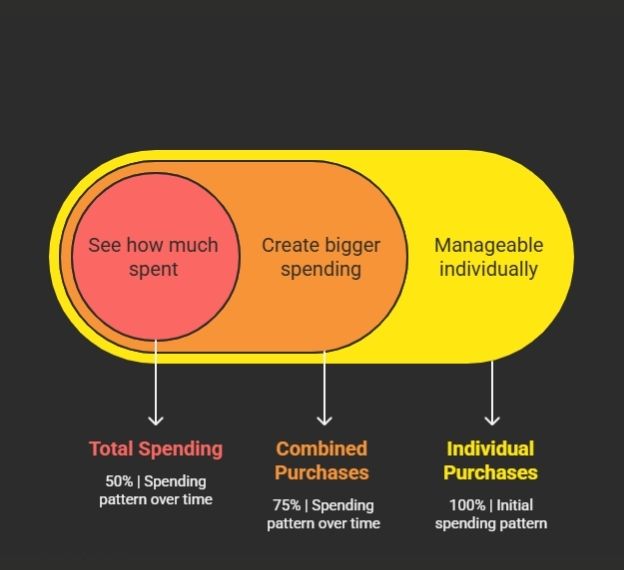
Most users do not overspend in one big moment. They overspend through many smaller orders spread across time. One gadget, one grocery order, one beauty purchase, and one household product may all feel manageable individually, but together they create a much bigger spending pattern.
- reduces guesswork around total shopping spend
- helps users become more budget-conscious
- makes spending review faster than manual tracking
- improves visibility into repeat buying habits
This is why people search for terms like amazon spending calculator, Flipkart spending calculator, or spending calculator for amazon. The need behind those searches is simple: people want a direct way to see how much they have spent.
How does the Ecom Spending Calculator work?
The extension is designed to keep the process simple. Users install it, open Amazon or Flipkart, go to their order history, and run the tool to review their spending summary.
- scans supported order history pages
- calculates total spend automatically
- saves time compared to spreadsheets
- gives users a cleaner spending overview
That ease of use is what makes the tool more practical than manual tracking. A browser-based solution fits naturally into the shopping journey, which is why an amazon spending calculator extension or Flipkart spending calculator extension feels more useful than trying to calculate totals by hand.
Why browser-based tracking feels easier
The biggest advantage of an extension is convenience. Users do not need to export data, maintain notes, or do repeated calculations every time they want an updated view.
- works closer to where shopping actually happens
- reduces extra effort
- makes order history instantly more useful
- turns shopping data into a simple summary
For many users, that convenience is the main reason they look for an Ecom Spending Calculator instead of using manual methods.
How to Use the Spending Calculator for Amazon and Flipkart
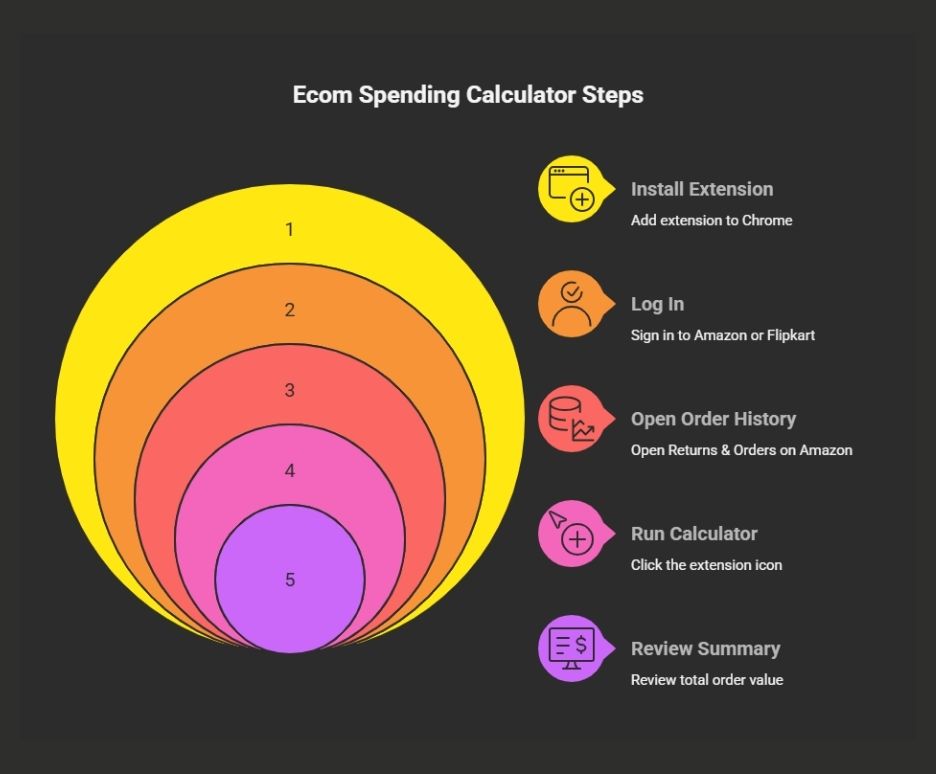
Using the Ecom Spending Calculator is simple. The tool is built for users who want to check total spend quickly without manually adding old orders.
Step 1: Install the extension
Start by installing the extension so it is available while browsing Amazon or Flipkart.
- add the extension to Chrome
- keep it pinned in the browser toolbar
- make sure it is enabled before use
Step 2: Log in to Amazon or Flipkart
Open the platform where you want to calculate total spend and sign in with the account whose order history you want to review.
- use your Amazon account for Amazon order tracking
- use your Flipkart account for Flipkart order tracking
- keep your account logged in before running the tool
Step 3: Open your order history
The calculator works best when you are on the order history page because that is where purchase details are available for review.
- open Returns & Orders on Amazon
- open My Orders on Flipkart
- stay on that page before starting the calculation
Step 4: Run the Ecom Spending Calculator
Now click the extension icon and let the tool process your order history. This is where a spending tracker for amazon and flipkart becomes useful because it saves users from checking orders one by one.
- scans supported order pages
- calculates total spend automatically
- saves time compared to manual math
- gives a faster spending summary
Step 5: Review your spending summary
Once the scan is complete, users can understand their shopping behavior much more clearly. This is especially useful for budgeting and expense awareness.
- review total order value
- understand shopping patterns better
- track spending across time
- use the summary for smarter budgeting
Why is this useful for Amazon and Flipkart users?
Frequent Amazon buyers often place many smaller orders across essentials, electronics, groceries, or home items. Flipkart users do the same during major sale periods, seasonal offers, and repeat purchases. In both cases, total spending becomes harder to estimate over time.
- useful for repeat shoppers on both platforms
- helps users review long-term shopping behavior
- supports better financial awareness
- makes hidden spending more visible
That is why a spending tracker for amazon and flipkart is not just a convenience tool. It is a practical way to understand where online shopping money is going.
What makes it useful during sales?
Sale periods can create the illusion of saving more while actually increasing total spending. Users often add extra products because the discount feels attractive.
- helps users review actual purchase totals
- useful during festive and seasonal sales
- supports better decision-making before future purchases
- makes shopping habits easier to evaluate later
This is where a flipkart total spending calculator or combined Amazon and Flipkart tracker becomes especially useful.
Can mobile users benefit too?
Yes. Many people also search for a Flipkart spending Calculator for Mobile because shopping behavior is now strongly mobile-first. Even when the extension experience is more natural in Chrome, the real value remains the same: users want an easier way to check total spending.
- relevant for mobile-first shoppers
- useful for users switching between devices
- supports spending visibility beyond desktop-only habits
- keeps the use case practical and modern
In the same way, someone searching for a spending calculator for amazon and flipkart app is usually not thinking about technical labels. They simply want a tool that helps them track total spend more easily.
Who should use the Ecom Spending Calculator?
This tool is most useful for shoppers who buy regularly and want a clearer understanding of how much they are spending across platforms.
- frequent Amazon users
- regular Flipkart buyers
- sale-driven shoppers
- budget-conscious users
- people tracking refunds, returns, or canceled orders
For these users, a spending tracker for flipkart or combined solution for both marketplaces can become a genuinely helpful part of smarter online shopping.
When is it most useful?
The calculator becomes more valuable when order volume increases and spending starts becoming harder to estimate mentally.
- during major sale events
- during monthly budget reviews
- when tracking repeat purchases
- when checking shopping habits across longer periods
That is why terms like spending calculator for flipkart and flipkart spending calculator extension continue to make sense from a real user-intent point of view.
Why this topic works well for EcomBullet
This is a strong topic because it is built around a real utility, not a vague shopping tip. The extension on ecombullet.com solves a specific problem in a direct and easy-to-understand way.
- matches clear user intent
- supports both SEO and AI-search discoverability
- builds topical relevance around eCommerce utilities
- positions EcomBullet positively as a practical tool brand
That is what makes the Ecom Spending Calculator more than just another extension. It is a useful shopping-awareness solution built for users who want clarity, convenience, and better control over their spending.
Final Verdict
The Spending Calculator for Amazon and Flipkart is a practical tool for anyone who shops regularly and wants a faster way to review total spending. It helps turn scattered order history into a clear spending summary, which makes budgeting, shopping analysis, and expense awareness much easier.
- improves visibility into online shopping spend
- reduces manual work
- supports Amazon and Flipkart users equally
- makes eCommerce expenses easier to understand
For users looking for a simple and reliable Ecom Spending Calculator, ecombullet.com offers a strong solution built around exactly that need.
FAQs
It is a browser-based tool that helps users calculate and review how much they have spent on Amazon and Flipkart using order history.
It is best for frequent Amazon and Flipkart shoppers, sale-season buyers, and users who want a clearer view of their total online shopping spend.
No. While the extension experience is more natural in a browser environment, the spending visibility it offers is still highly relevant for users who shop across desktop and mobile.
Because shopping platforms show individual orders clearly, but total spending is harder to review quickly without a dedicated calculator.